

Grove Networks Blog

Grove Networks Blog

Grove Networks has been serving the Miami area since 2000, providing IT Support such as technical helpdesk support, computer support, and consulting to small and medium-sized businesses.
Font size: + –

Tip of the Week: How to Freeze Excel Rows and Columns

b2ap3_thumbnail_microsoft_excel_400.jpgModern office workers spend lots of time entering data and crunching numbers with Microsoft Excel. Therefore, it’s essential that Excel users know how to best navigate a spreadsheet. One of the best ways to make Excel easier to use is by freezing its rows and columns.

It may be a pain point for Excel users to view a spreadsheet that’s larger than their screen. It can be annoying to try and scroll up, down, or sideways, only to have a crucial piece of information that you want to reference scroll off screen. The best way to prevent this is to freeze a needed row or column into place so that it doesn’t move while you scroll through your spreadsheet. Here’s how you do it:

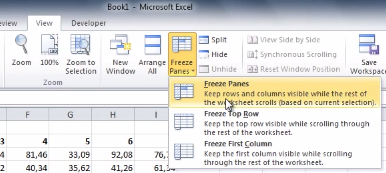
The first thing you’ll do is select the cell that’s in the first column and row that you don’t want to be frozen. Next, go to the View tab and click Freeze Panes. A drop down menu will appear. From here, click on the first option, Freeze Panes.

freeze columns

This will freeze multiple rows and columns in place, which means that they’ll stay in place and visible when you scroll. With your selected rows and columns now frozen, test this out by scrolling sideways, up, and down on your spreadsheet.

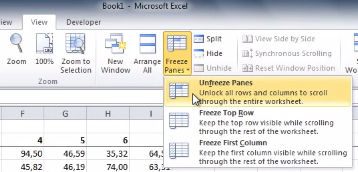
When you’re ready to unfreeze your rows and columns, simply select any row or column and then go to the View tab. Now go to Freeze Panes > Unfreeze Panes.

unfreeze columns

By freezing columns and rows, you’ll find Excel to be easier to navigate. Check back with Grove Networks’s blog every week for more time-saving tips.


Comments

No comments made yet. Be the first to submit a comment
Guest
Already Registered? Login Here
Saturday, 24 October 2026

About Grove Networks

Grove Networks has been serving the Florida area since 2000, providing IT Support such as technical helpdesk support, computer support and consulting to small and medium-sized businesses. Our experience has allowed us to build and develop the infrastructure needed to keep our prices affordable and our clients up and running.

get a free quote

Understanding IT

Get the Knowledge You Need to Make IT Decisions

Technology is constantly evolving, and keeping up can feel overwhelming. Whether you want to understand cybersecurity threats, explore automation, or learn how regulations like PCI DSS impact your business, we’ve made it easy to access clear, straightforward insights on key IT topics.

Insights to Understanding IT

Contact Us

9350 South Dixie Highway Suite 1020
Miami, Florida 33156

Mon to Fri 9:00am to 6:00pm

support@grovenetworks.com

(305) 448-6126